
With our Subscription & Billing tab, you can complete your purchases, manage existing subscriptions and view your next billing date, meaning control of your subscription is truly in your hands.
To complete your purchase of Goodnotes Teams via Credit Card, follow these simply steps:
-
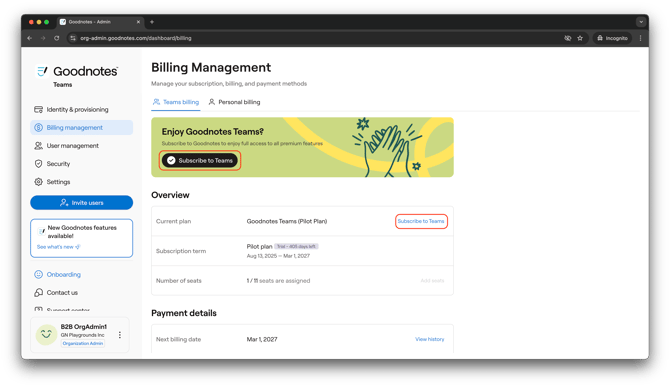
Head to the Subscription & Billing tab and click to 'Subscribe to Teams'
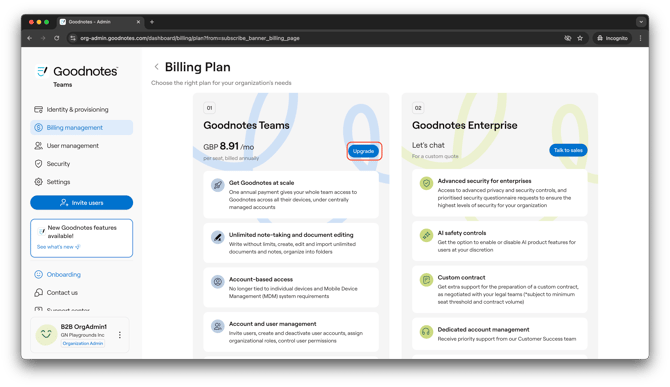
- Head to your appropriate Billing Plan and click 'Upgrade' (If you'd like more information relating to Goodnotes Enterprise, click here)
- Once you have clicked 'Upgrade', you will be taken to the Subscription page where you can select your payment method.
- Ensure you select the 'via credit card' option from the Payment method dropdown. (If you would like further information about purchasing via Invoice, please click here.)
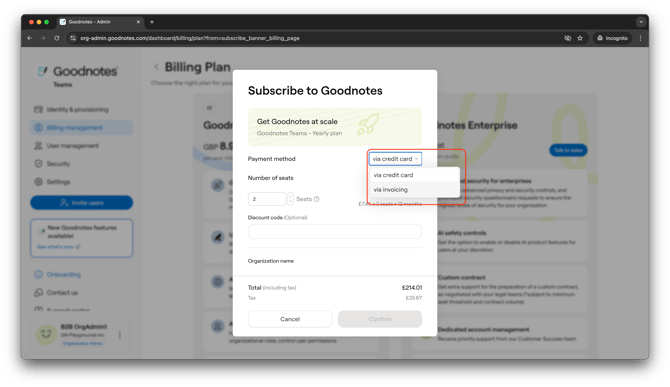
- Once you have selected Credit Card as your payment option you can enter your desired seat number and payment information. (Important note: for credit card payments, the currency is defaulted to your local currency based on your geo)
- We can now select the number of seats your require for your organization.
- This can be increased later on and at a pro-rated price if you do need more, so don't worry if you're unsure how many seats you'll require.
- From here, enter in your Organization name, Billing Contact's details (including name and email).
- Then enter in your business address, including the Country/Region, City, Street Address, State/Province/Region, Postal/Zip Code & Phone Number.
- If you are Tax Exempt, be sure to enter your Tax ID at this stage too.
- Only if you're in an applicable location will your Tax be automatically deducted, if it is not prior to purchase, please either check your Tax ID
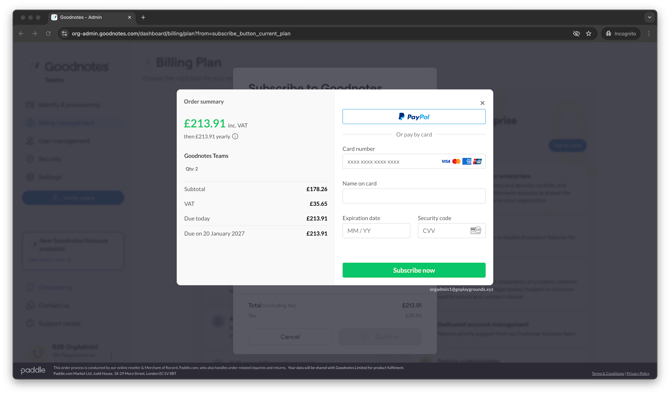
- Once you've entered in your information and clicked Confirm you will be brought to the order summary and checkout page.
- In here you can complete your purchase via PayPal, Credit or Debit Card.
- Once you have entered in your applicable information you will be brought back to the Subscription & Billing tab and your subscription will show as live.