
Before switching your sign-in method from OIDC to SAML SSO, please review Before You Change Your Authentication Method
As an Organization Admin you may see a prompt to create a new organization instead of joining an existing one during SSO setup. In this instance, you may need to change your Identity Provider to properly connect to your organization account.
Why does this happen?
When a user signs in to Goodnotes via SAML SSO, Goodnotes treats this as a separate identity from any existing account created via OIDC (Microsoft, Google, Apple or OTP). Even if the email address is identical, an SSO sign-in creates a brand new Goodnotes account rather than linking to the existing one.
For that new SSO account to land in your organisation, one of two things must be true at the moment of sign-in:
-
Auto-capture is enabled for the domain, so Goodnotes automatically pulls the account into your organisation, or
-
The user has already received and accepted an invitation from the Admin Console
If neither condition is met, Goodnotes has no organisation to route the new SSO account to. Instead of joining your organisation, the account is created as a standalone free account with its own empty organisation. This is what causes the "new organisation" screen.
This most commonly happens in the following scenarios:
Scenario 1 - Admin tests SSO immediately after setup An admin configures SAML SSO but does not enable auto-capture or set up invitations before testing. They sign in via SSO, which creates a new floating account rather than joining the existing organisation.
Scenario 2 - Users sign in via SSO before being invited Auto-capture is off and users attempt to sign in via SSO without having received an invitation. A new empty account is created for each user rather than them joining the organisation.
Scenario 3 - Organisation switches from OIDC to SAML without preparing users An organisation was previously using Microsoft, Google, or Apple (OIDC) sign-in. When SSO is enforced, existing users sign in via SSO for the first time. Because their OIDC and SSO accounts are treated as separate identities, each user lands in a new empty account instead of their existing one. Their documents and settings remain on the original OIDC account.
In all cases, the steps below will resolve the issue for the admin account. For organisations where multiple users have been affected, contact business_support@goodnotes.com.
Please follow the steps below to ensure your sign-in completes using SSO:
- Please make sure to back up your library before making any changes.
- Sign in to the Admin Console (org-admin.goodnotes.com) with your original OIDC method (Apple, Google, Microsoft or OTP) and ensure you have set up your chosen onboarding method before proceeding - either auto-capture or email invitations. If neither is in place, signing in via SSO will create a new empty account instead of joining your organisation.
- Sign out
- Sign in to the App via web (https://web.goodnotes.com) using SAML SSO.
- Click the "gear" icon in the top-right to open the settings menu, then click "Manage Account", then "Delete Account".
-
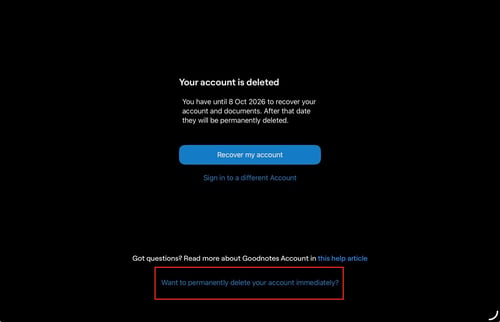
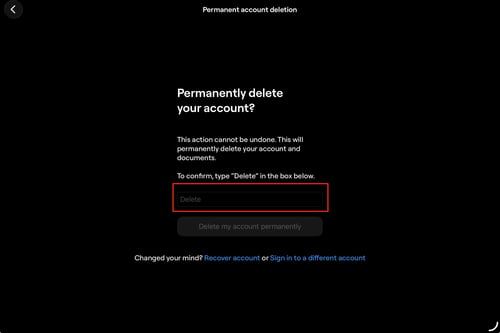
Follow the steps to delete the account, including "Want to permanently delete your account immediately?" at the bottom of the screen and confirming.
- Go back to the Admin Console (https://org-admin.goodnotes.com). Sign in with SAML SSO. This time the account should automatically join the organization. You should see the "No access" screen because your new SAML SSO user has the "Member" role.
- To promote your new SAML SSO user to Organization Admin, sign out of the Admin Console, then sign in again using your original sign in method (Google/Apple/Microsoft/OTP). Go to "People" and find the row for your new SAML SSO account. Change the role to "Organization Admin".
- Finally, sign out of the Admin Console once more and sign in using SAML SSO.
You should now have access to the Admin Console using SAML SSO. You can delete the original account created by the initial sign-in (Google/Apple/Microsoft/OTP) from the Admin Console if you wish.
Please make sure to complete the "permanently delete your account" step at the end of the deletion process, as this step is easily missed.