---
title: "How to: Turn on the \"Reminder To Enable Auto Backup\""
description: Remind users to backup information via configurable features on your Goodnotes Enterprise License Key deployment
---
[Skip to content](https://go.goodnotes.com/support/how-to-turn-on-the-reminder-to-enable-auto-backup-popup-for-managed-devices#main-content)
- [English](https://go.goodnotes.com/support/how-to-turn-on-the-reminder-to-enable-auto-backup-popup-for-managed-devices)
- [Deutsch](https://go.goodnotes.com/de/how-to-turn-on-the-reminder-to-enable-auto-backup-popup-for-managed-devices)
- [日本語](https://go.goodnotes.com/ja/how-to-turn-on-the-reminder-to-enable-auto-backup-popup-for-managed-devices)
English
Show submenu for translations
[](https://go.goodnotes.com/support?hsLang=en)
Open main navigation
Close main navigation
- - [English](https://go.goodnotes.com/support/how-to-turn-on-the-reminder-to-enable-auto-backup-popup-for-managed-devices)
- [Deutsch](https://go.goodnotes.com/de/how-to-turn-on-the-reminder-to-enable-auto-backup-popup-for-managed-devices)
- [日本語](https://go.goodnotes.com/ja/how-to-turn-on-the-reminder-to-enable-auto-backup-popup-for-managed-devices)
English
Show submenu for translations
- [Contact us](https://26813687.hs-sites-eu1.com/get-support-with-our-dedicated-support-team)
[Contact us](https://26813687.hs-sites-eu1.com/get-support-with-our-dedicated-support-team?hsLang=en)
How can we help you?
- There are no suggestions because the search field is empty.
1. [Goodnotes Business Support Site](https://go.goodnotes.com/support?hsLang=en)
2. [License Keys](https://go.goodnotes.com/support/license-keys?hsLang=en)
3. [Installation and Management](https://go.goodnotes.com/support/license-keys?hsLang=en#installation-and-management)
# How to: Turn on the "Reminder To Enable Auto Backup"
As a Goodnotes Enterprise License Key user you can provide helpful reminders to your end-users about ensuring they keep their data safe. To do this you can enable a reminder to enable Auto-Backup via your managed configuration.
The option to flag this is called `ReminderToEnableAutoBackup` in AppConfig. This can be set by the Administrator via your MDM software and will assist in the creation and maintenance of backup data through our [Auto-Backup](https://support.goodnotes.com/hc/en-us/articles/7352786555279-Use-Auto-Backup-to-automatically-create-a-copy-of-your-documents-in-a-supported-cloud-storage) functionality.
If set to true, a popup will be displayed whenever Goodnotes is opened and only if the end user hasn't enabled Auto-Backup and/or signed in to an appropriate backup service.
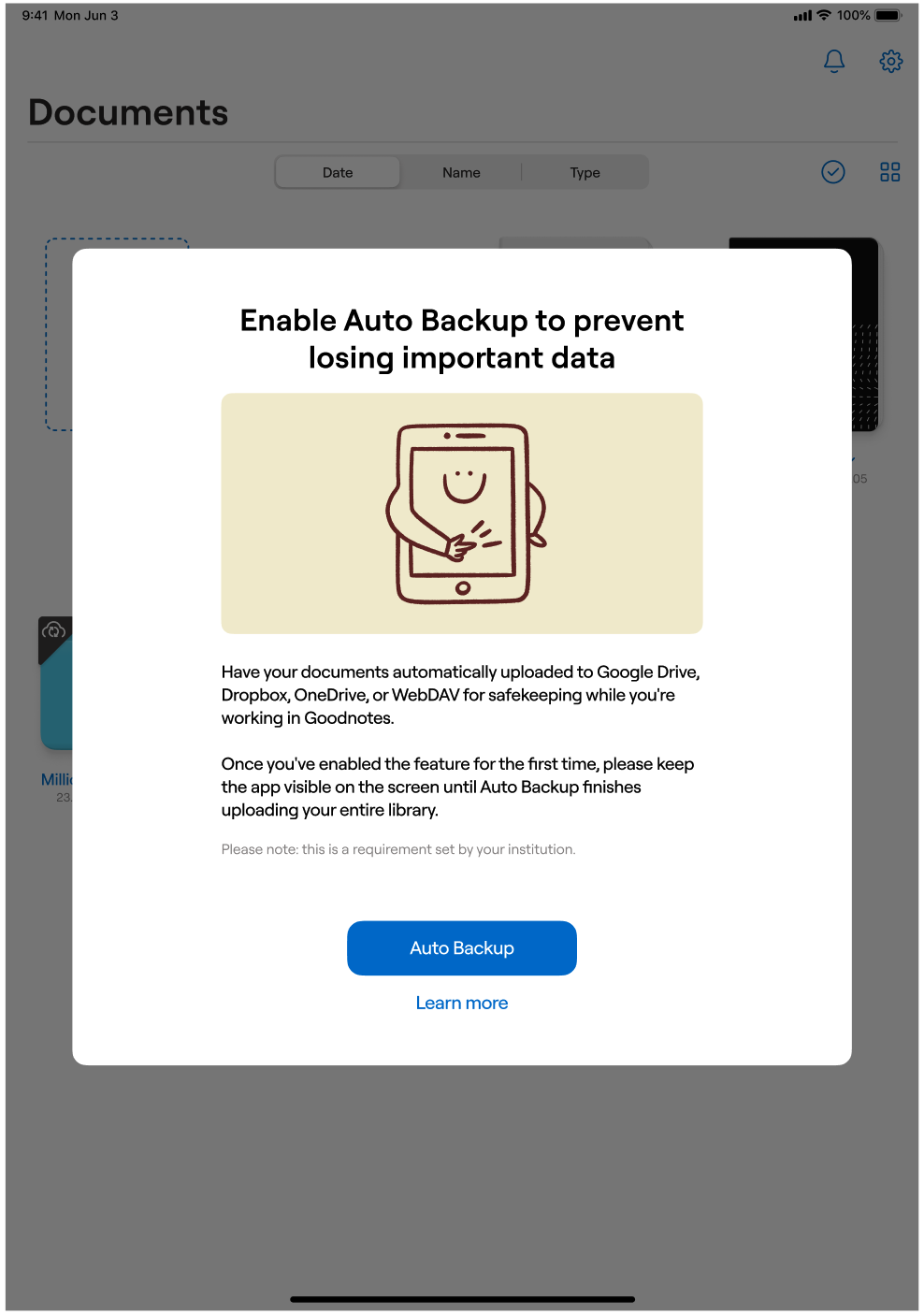
Once the user has enabled Auto-Backup and signed in to one of the available cloud storages (e.g. Google Drive, OneDrive, Dropbox or WebDAV) the Auto Backup reminder will no longer appear on each time the app is in the foreground.
To enable this feature in your AppConfig deployment, simply edit your existing XML file, or appropriate lines in your deployment to include the following:
```
LicenseKey AAAAAA-BBBBBB-CCCCCC-DDDDDD-123456-V3 ConfigurableFeatures ReminderToEnableAutoBackup
```
- [Set up & Manage your Goodnotes Organization](https://go.goodnotes.com/support/set-up-manage-your-goodnotes-organization?hsLang=en#main-content)
- [Onboarding your Goodnotes Organization](https://go.goodnotes.com/support/set-up-manage-your-goodnotes-organization?hsLang=en#onboarding-your-goodnotes-organization)
- [Authentication & Identity](https://go.goodnotes.com/support/set-up-manage-your-goodnotes-organization?hsLang=en#authentication-identity)
- [Managing your Organization](https://go.goodnotes.com/support/set-up-manage-your-goodnotes-organization?hsLang=en#managing-your-organization)
- [Subscription & Billing](https://go.goodnotes.com/support/set-up-manage-your-goodnotes-organization?hsLang=en#subscription-billing)
- [Joining an Organization](https://go.goodnotes.com/support/set-up-manage-your-goodnotes-organization?hsLang=en#joining-an-organization)
- [Support & FAQs](https://go.goodnotes.com/support/support-faqs?hsLang=en#main-content)
- [Get Support](https://go.goodnotes.com/support/support-faqs?hsLang=en#get-support)
- [Goodnotes Features](https://go.goodnotes.com/support/support-faqs?hsLang=en#goodnotes-features)
- [Frequently Asked Questions](https://go.goodnotes.com/support/support-faqs?hsLang=en#frequently-asked-questions)
- [Troubleshooting](https://go.goodnotes.com/support/support-faqs?hsLang=en#troubleshooting)
- [License Keys](https://go.goodnotes.com/support/license-keys?hsLang=en#main-content)
- [Installation and Management](https://go.goodnotes.com/support/license-keys?hsLang=en#installation-and-management)
[-2.png?width=250&height=43&name=Combination_black_primary@2x%20(2)-2.png "Combination_black_primary@2x (2)-2")](https://go.goodnotes.com/support?hsLang=en)
Copyright © 2026, Goodnotes